
Products · Audatex Integration

AudaWatch

Keep the insurer watching your repair — live, straight from Teamwork. AudaWatch is the built‑in link between TMS Teamwork and Audatex RepairWatch: it keeps the insurer’s repair record updated with real‑time progress — the stage and workshop department the car is in, the dates, work‑in‑progress photos and notes — so assessors can monitor the repair remotely instead of visiting.

Live stage & department WIP photos into the right stage Dates kept in sync Notes to the insurer Insurer-aware
Call Us: +27 11 482 2161
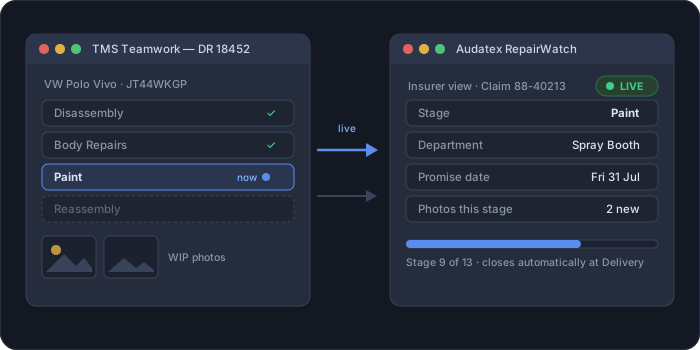
AudaWatch — Teamwork feeding live repair progress to Audatex RepairWatch
What it is

The insurer’s window into the workshop — without the phone calls

Insurers use Audatex RepairWatch to follow a repair’s progress: what stage it’s at, which department the car is in, when it’s promised, and photos along the way. Normally the shop keeps that updated in a separate portal — or the assessor phones, or drives out. AudaWatch does it from inside Teamwork: enable it on a job and Teamwork feeds the current stage and workshop department, the booking and promise dates, your WIP photos and your notes straight to RepairWatch — automatically placed in the right repair stage. Only the stages that insurer supports are synced, so their record stays accurate. Less chasing, faster authorisations, and a live, transparent record for the insurer.

Everything it does

Full capabilities

Enable on the job — it finds the repair

One switch, per job.

  • Turn AudaWatch on for a job and it locates the matching repair on RepairWatch.
  • Not there yet? It prompts you to add it — no jumping to another system.
  • Per‑site connection set‑up (terminal / profile), configured once.

Dates kept in sync

One source of truth for the timeline.

  • The job’s booking and promise / delivery dates update the RepairWatch repair.
  • Change a date in Teamwork and RepairWatch is updated with it — no double entry.

Live stage & department tracking

The insurer always knows where the car is.

  • Sends which workshop department the vehicle is in and the current repair stage, updated as the job moves through the shop.
  • Only insurer‑supported stages are synced: any stage that insurer doesn’t support is skipped, so their record only ever shows stages that apply to them.
1Quotation Book Date 2Estimate 3Insurance Approval 4Disassembly 5Mechanical Repairs 6Waiting for Parts 7Structure Repairs 8Body Repairs 9Paint 10Reassembly 11Detailing 12Ready for Delivery 13Delivery

Work-in-progress photos

Proof of progress, in the right place.

  • Upload WIP photos from within Teamwork.
  • They appear in RepairWatch under the correct repair stage — automatically.
  • Remove a photo when needed.
  • Photos are right‑sized and compressed per site so uploads are fast and consistent.

Notes to the insurer

Manage in Teamwork, publish when ready.

  • AudaWatch notes have their own section in Teamwork.
  • Write and manage them there, then upload to RepairWatch in a click — they appear on the repair for the insurer to see.

Hands-off close

The repair wraps itself up.

  • Once the job reaches Delivery, RepairWatch closes the repair automatically on the insurer’s side.
  • Everything runs in the background — the program keeps working while it uploads.
How it works

Four steps

1

Enable

Switch AudaWatch on for the job; it finds or adds the repair.

2

Update stage

Move the job on — the insurer’s stage updates with it.

3

Photos & notes

Upload WIP photos and notes into the right stage.

4

Delivery

At delivery the repair closes on RepairWatch automatically.

See it in action

Watch the walkthrough

Link a job once and the insurer’s system follows the repair by itself — stages, dates, notes and photos — so nobody has to phone your workshop to ask “where is my car?”

Animated walkthrough — open the full demo in a new tab.

Why it matters

What the workshop gets

Fewer assessor visits & calls

The insurer sees live progress and photos remotely — less chasing, fewer interruptions on the floor.

Faster authorisations

Keeping the repair current keeps the insurer moving — approvals and payments don’t stall on “where’s the car?”

One system, no re-keying

Stage, dates, photos and notes all flow from Teamwork — no separate RepairWatch portal to keep updated.

Right stage, every time

Insurer-aware mapping puts each update and photo where it belongs, so the insurer’s record is accurate.

Proof on the record

WIP photos and notes build a transparent, defensible history of the repair.

Better insurer relationships

A shop that keeps RepairWatch live is an easier shop to send work to.

Requires an active Audatex RepairWatch account; available stages depend on the insurer. RepairWatch and Audatex are trademarks of their respective owner.

AudaWatch includes AudaConnect — billed by Audatex separately.

Get in touch

Ready to stop the “where’s my car?” calls?

See how AudaWatch keeps the insurer’s RepairWatch record live from inside Teamwork — stages, dates, photos and notes, automatically.

Sales

Talk to Ryno about pricing & demos.

ryno@tmsteamwork.co.za

Support

Product help & technical assistance.

support@tmsteamwork.co.za

National line

Mon–Fri, business hours.

+27 11 482 2161

Certified

Application, security & integrity.

DigiCert verified
TMS Teamwork
Legal